> For the complete documentation index, see [llms.txt](https://docs.sergioverse.com/llms.txt). Markdown versions of documentation pages are available by appending `.md` to page URLs; this page is available as [Markdown](https://docs.sergioverse.com/cornhole.md).
# Cornhole
A simple and fun Cornhole (bean bag toss) minigame for your FiveM server. Players can compete 1v1 or 2v2. Perfect for community events, roleplay activities or a business.
[Buy it here now 🛒](https://store.sergioverse.com/package/cornhole)
### 📸 Preview
***
### 📦 Features
* ✅ Fully synced multiplayer gameplay
* ✅ Custom 3D props
* ✅ Smooth animations
* ✅ Scoreboard system (up to 21 points)
* ✅ Easy-to-configure game rules
* ✅ Optimized for performance
* ✅ Compatible with ESX/QBCore and ox\_target/qb-target. Can also add custom framework or target system.
***
### ⚙️ Installation
***
#### 1. Dependencies
* **Framework (choose one):**
* [ESX Legacy](https://github.com/esx-framework/esx-legacy)
* [QBCore](https://github.com/qbcore-framework/qb-core)
* Your custom framework
* **Target system (choose one):**
* [ox\_target](https://github.com/overextended/ox_target)
* [qb-target](https://github.com/qbcore-framework/qb-target)
* Your custom target system
* **Required library:**
* [ox\_lib](https://github.com/overextended/ox_lib)
***
#### 2. Sverse Cornhole Resources
Download and install:
* **sverse\_cornhole**
* **sverse\_cornhole\_assets**
Place them inside your `resources` folder wherever you want.
***
#### 3. Add to `server.cfg`
Make sure the framework and targeting system are started **before** the Cornhole resources.\
Add the following lines to your `server.cfg`:
```cfg
# ... dependencies...
# Cornhole resources
ensure sverse_cornhole
ensure sverse_cornhole_assets
```
***
#### 4. Inventory Setup
If you are using **ESX**, **QBCore** or **ox\_inventory**, add the Cornhole item.\
By default, the item name is `cornhole` (can be changed in the config). If you are using a custom option do it your way.
**ESX Item (SQL)**
```sql
INSERT INTO items (name, label, weight, rare, can_remove)
VALUES ('cornhole', 'Cornhole', 5000, 0, 1);
```
**QBCore Item (@qb-core/shared/items.lua)**
```lua
cornhole = { name = 'cornhole', label = 'Cornhole', weight = 5000, type = 'item', image = 'cornhole.png', unique = false, useable = true, shouldClose = true, description = 'Cornhole game set' }
```
***
#### 5. Item Image
The default image (`cornhole.png`) is included inside **sverse\_cornhole/setup**.
Copy it to your inventory images folder:
* **ESX:** `resources/[esx]/esx_inventoryhud/html/img/`
* **QBCore:** `resources/[qb]/qb-inventory/html/images/`
* **ox\_inventory:** `resources/[ox]/ox_inventory/web/images/`
* **custom**: add it where it needs to be.
Make sure the filename matches the item name you added (`cornhole.png`).
***
#### 6. **(Only if using custom systems)** Implement bridge
If your server uses a **custom framework** or a **custom targeting system** not directly supported, you can implement the necessary bridges.
* **Framework Bridge:**\
Located in `bridges/framework/custom/`.\
These files contain **placeholder methods** that allow the Cornhole script to interact with your framework (e.g., checking player jobs or inventory).
* **Interaction Bridge:**\
Located in `bridges/interaction/custom/`.\
These files contain **placeholder methods** for interaction systems (registering zone and removing it).
**How to implement:**
1. **Open the provided placeholder files**.
2. **Study the existing bridges** (for ESX, QBCore, ox\_target, qb-target) to see how they handle data and trigger events.
3. **Replace the placeholder functions** with your custom code that performs the expected actions.
* Example: If a method receives a `playerId` and `itemName`, implement the logic to check if the player has the item in your inventory system.
4. **Make sure your code returns the expected values** so the Cornhole script can function correctly.
> Tip: Keep the method names and event triggers consistent with the placeholders. This ensures the Cornhole script will work without modifying its core logic.
***
✅ Done! Restart your server and the Cornhole script will be ready to use.
***
### 🎮 How to Play
Playing Cornhole is very simple! Here’s the full step-by-step guide:
***
#### 1. Setup the Boards
* The player who has the **Cornhole item** (`cornhole`) can **use** it to start the setup.
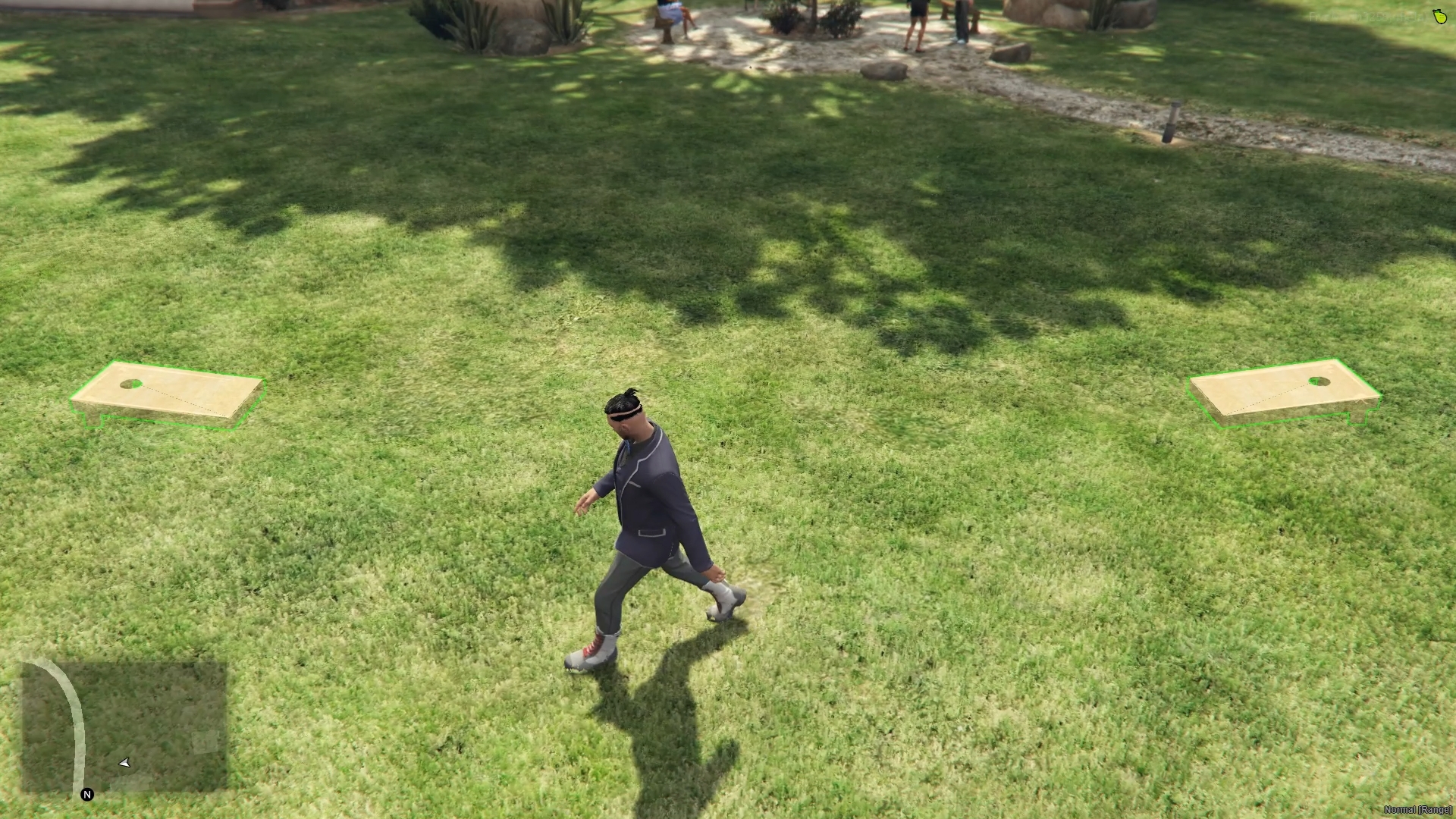
* A **preview mode** will appear, showing where the two boards will be placed.
* Move around and aim where you want the boards to appear.
* Need to see tables in green meaning the terrain is valid.
* Confirm the placement with **Left Click (LMB)**.
* Default tables can also be added through the configuration.
***
#### 2. Create a Game
* The **owner** (the player who placed the boards) can always create a new match.
* Other players could start a new game depending on the configuration.
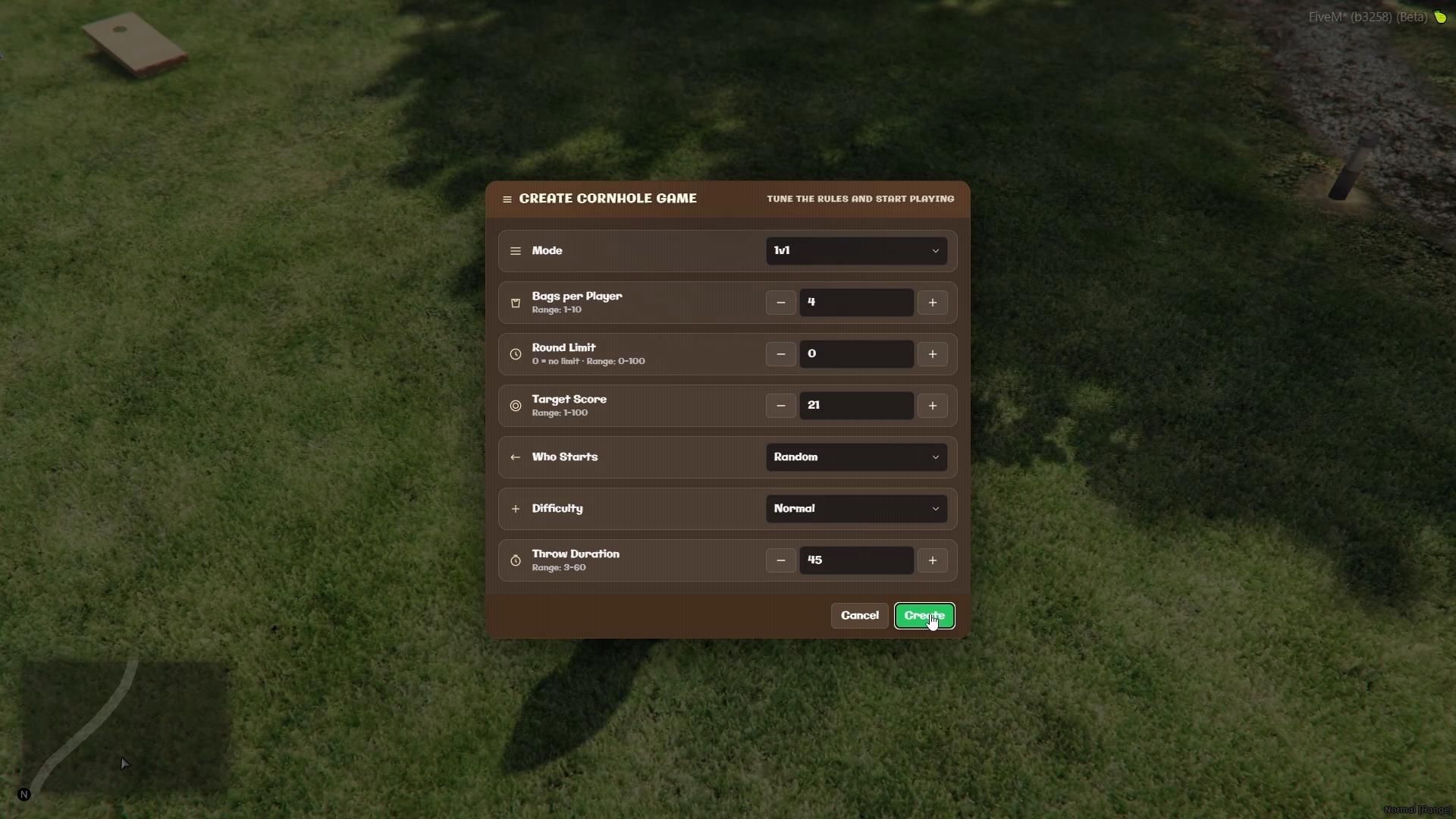
* A setup menu will appear where you can choose game options.
* By default, the script uses the settings defined in `config.lua`.
* The throwing difficulty can be adjusted, with more or less aim assistance depending on your preference.
* Confirm to **start the lobby** (default duration: 1 minute).
***
#### 3. Join a Team
* Other players can walk up to the boards and use the **target system** on a table to join a team.
* Once both teams are ready, the game will automatically start.
***
#### 4. Gameplay & Throwing
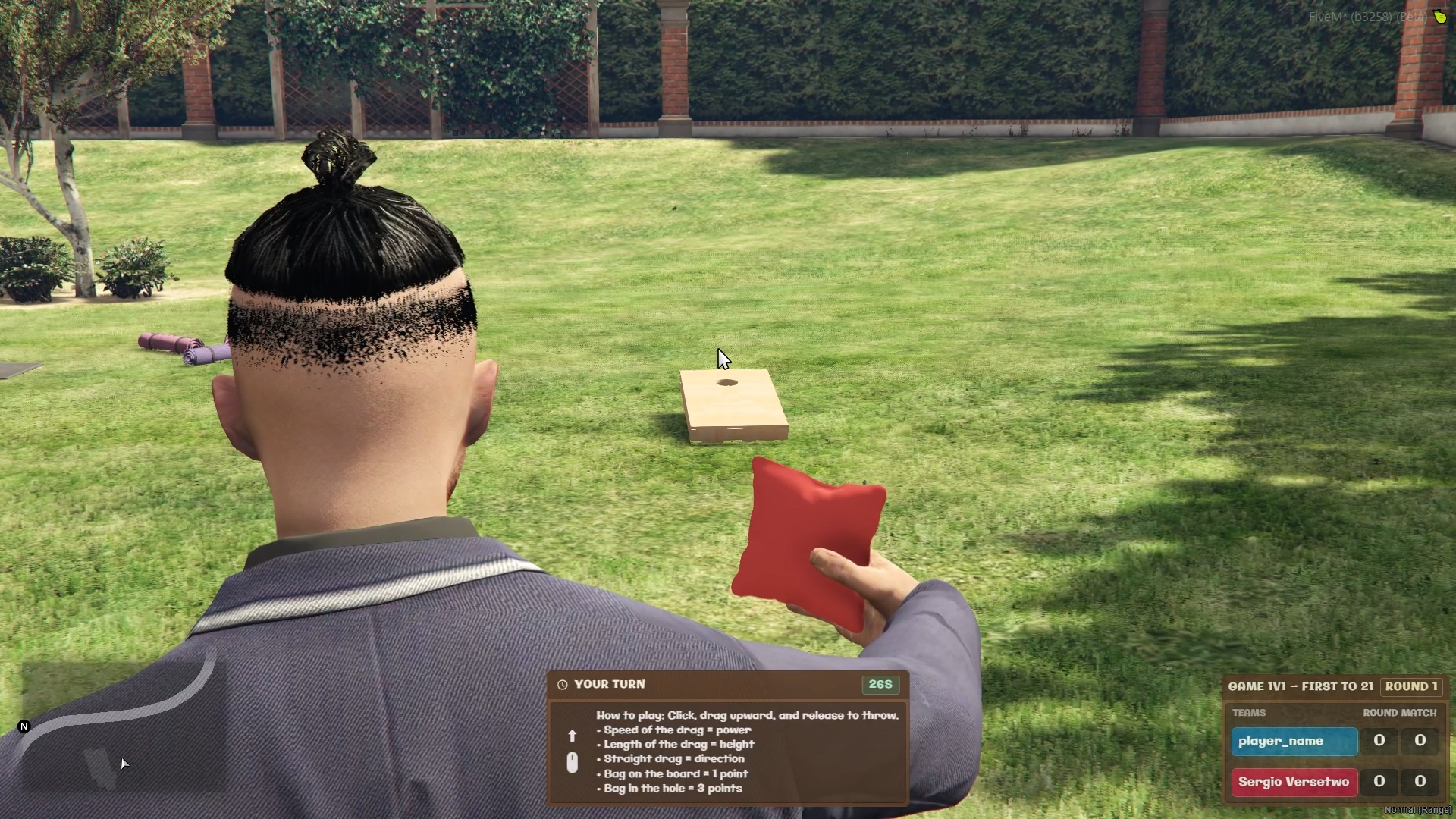
* The match begins and players are placed in their **throwing positions** each round when its their turn.
* The camera zooms in for throwing mode.
* To throw a bag:
1. **Click and hold Left Mouse Button (LMB)**.
2. **Drag the mouse upwards** to set the throw’s strength and angle.
3. **Release** to launch the bag.
⚡ Tips for throwing:
* **Faster drag = stronger throw**.
* **Higher drag = more arc**.
* **Straight vertical drag = straighter shot**.
* **Slight tilt left/right = bag curves accordingly**.
***
#### 5. Scoring
The script uses standard **Cornhole rules**:
* Bag on the board = **+1 point**
* Bag in the hole = **+3 points**
* Bags can knock other bags off the board or into the hole.
* The **first team to reach 21 points** wins the match.
***
✅ That’s all! Once a match finishes, you can immediately start a new game.
***
### 🛠️ Configuration
The `Config.lua` file inside `sverse_cornhole` allows you to customize every aspect of the Cornhole script, from framework detection and permissions to gameplay rules, UI placement, models, and animations. Below is a detailed explanation of each setting.
***
#### 1. Basic Settings
* **framework**: Automatically detects the server framework with `auto` or you can force it to `es_extended` (ESX),`qb-core` (QBCore) or `custom`.
* **interaction**: Determines which targeting system to use. Can be `auto`, `ox_target`, `qb-target` or `custom`.
* **locale**: Sets the language of the script. Default is `en`, also already added `pt`, `fr`, `de` and `es`. Add your custom translations inside `sverse_cornhole/locales/example.lua`.
***
#### 2. Item & Permissions
* **cornholeItem**: The item used to place/setup a cornhole set. Be careful with the item installation.
* **whoCanSetupSet**: Defines who can place cornhole boards:
* `"anyone"` – any player with the item.
* `"job"` – only players with jobs listed in `allowedJobs`.
* `"admin"` – only admins with the proper ACE permission (`sverse_cornhole.item`).
* **whoCanCreateGame**: Determines who can start a game (owner will be always allowed)
* `"anyone"` – any player.
* `"job"` – only players with a job in `allowedJobs`.
* `"owner"` – only the player who placed the boards.
* `"admin"` – only admins with permission (`sverse_cornhole.create`).
* **allowedJobs**: Jobs allowed to place boards if `whoCanSetupSet` or `whoCanCreateGame` is `"job"`.
* **showCharacterNames**: Show current character names in game or show IDs.
***
#### 3. Lobby & Court Settings
* **lobbyTimeout**: Seconds to wait for players before canceling a lobby.
* **leaveLobbyTimeout**: Time to leave a team in the lobby after leaving the area.
* **leaveGameTimeout**: Time to leave and cancel the game if leaving the area.
* **courtSyncLength / courtSyncWidth**: Area around the court for syncing players. Must be larger than the actual court.
* **courtLength / courtWidth**: Actual court size in meters.
* **distanceBetweenTables**: Distance between the two boards in meters.
***
#### 4. Default Game Options
* **defaultGameOptions.mode**: `'1v1'` or `'2v2'`.
* **defaultGameOptions.bagsPerPlayer**: Number of bags each player throws per round.
* **defaultGameOptions.roundLimit**: Max number of rounds (0 = unlimited).
* **defaultGameOptions.targetScore**: Points required to win.
* **defaultGameOptions.whoStarts**: `'red'`, `'blue'`, or `'random'`.
* **defaultGameOptions.difficulty**: `'easy'`, `'normal'`, `'hard'` – affects throw assist.
* **defaultGameOptions.throwDuration**: Maximum seconds per throw.
***
#### 5. Default Table Positions
* **defaultTables**: Default tables always available. Add them defining the position and heading.
* **position**: The center of the table.
* **heading**: The rotation/direction the table faces.
***
#### 6. UI Settings
* **lobbyAnchor, scoreboardAnchor, throwPromptAnchor, leavingAnchor**: Position of UI elements on screen. `top-left`, `top-right`, `bottom-left`, `bottom-right`, `top-center`, `bottom-center`, `center-left`, `center-right`
* **throwHelpKeyLabel**: Key label to show throw instructions (Y by default). Must be coherent with `throwHelpKeyCode`
* **throwHelpKeyCode**: Key code to show throw instructions. Must be coherent with `throwHelpKeyLabel`. [Available keys here](https://docs.fivem.net/docs/game-references/controls/).
***
#### 7. Models & Animations
* **tableModel / redBagModel / blueBagModel**: Game prop models.
* **tablePerfectSpotOffset**: Fine-tune table placement for aim assistance.
* **bagInHandOffset**: Position & rotation of the bag in player hand.
* **throwIdleAnimDict / throwIdleAnimName**: Animation when holding bag idle.
* **throwAnimDict / throwAnimName**: Animation for throwing.
* **throwUpdateInterval**: Time in milliseconds between throw position updates (lower = smoother). Recommended 50-250.
***
### 🧑💻 Game Finished Event
Server-side event triggered when a game finishes, either normally, by cancellation, or a tie. Provides full details about the game and participants.
```lua
-- Event
AddEventHandler('sverse_cornhole:onGameFinished', function(data)
-- data table structure:
-- data.setId : string, ID of the set
-- data.position : vector3, where the game was played
-- data.status : string, "canceled", "tie", "red_win", "blue_win"
-- data.options : table, includes all game options
-- data.scores : table with red and blue keys represeting final score
-- data.redTeam : table of player IDs
-- data.blueTeam : table of player IDs
print("Cornhole game ended at set: "..data.setId)
print("Played at: " .. data.position)
print("Status: "..data.status)
print("Red Team Score: "..data.scores.red)
print("Blue Team Score: "..data.scores.blue)
print("Red Team: "..table.concat(data.redTeam, ", "))
print("Blue Team: "..table.concat(data.blueTeam, ", "))
end)
```
***
### 🔌 Exports
#### Client
**`isPlayerInGame()` → `boolean`**
Returns `true` while the local player is actively in a cornhole match (state `"in_game"`), and `false` in every other state (idle, inside the setup menu, in the pre-game lobby, or after the game ended and cleanup finished).
```lua
if exports['sverse_cornhole']:isPlayerInGame() then
-- e.g. block phone usage, keep them out of vehicles, etc.
end
```
***
### 🎨 Per-game custom models
The internal `SetupManager:openSetupMenuWithItem` now accepts two optional parameters so different items / triggers can spawn a game with different board and bag models without mutating `Config`:
```lua
SetupManager:openSetupMenuWithItem(source, boardModel, bagModel)
```
* `boardModel` *(string, optional)* — custom model name used for **both** boards of that set. Invalid models fall back to `Config.tableModel` with a console warning.
* `bagModel` *(string | table, optional)*
* Pass a **string** to use the same custom bag model for both teams.
* Pass a **table** `{ red = "...", blue = "..." }` to override per team. Missing keys fall back to `Config.redBagModel` / `Config.blueBagModel`.
* Any invalid model falls back to the config default for that team, with a console warning.
Omitting both parameters preserves the original behavior exactly (backwards compatible).
This function is called from the framework bridges (`bridges/framework/es_extended/server.lua`, `bridges/framework/qb-core/server.lua`, `bridges/framework/custom/server.lua`) when a player uses the cornhole item. To wire up a second "premium" item with different models, edit the bridge for your framework and pass the extra arguments — the bridges are in `escrow_ignore` and therefore fully editable.
***
### 🐛 Debugging
Set `Config.Debug = true` at the top of `Config.lua` to enable verbose logs in the **server console**. Every debug line is prefixed with `[sverse_cornhole]` for easy grep/filter.
Config misconfigurations are always logged (red prefix) regardless of the Debug flag. If a game cancels with *"An internal error occurred"*, the actual root cause and the options at crash time are printed to the server console immediately above the cancellation.
***
### ❓ FAQ
**Q: Is it optimized for large servers?**\
A: Yes, the script is very lightweight and fully synced.
**Q: Who can place cornhole boards?**\
A: Depends on `Config.whoCanSetupSet`. Options are `"anyone"`, `"job"`, or `"admin"`.
**Q: Who can create a game?**\
A: Depends on `Config.whoCanCreateGame`. Options are `"anyone"`, `"job"`, `"owner"`, or `"admin"`.
**Q: How many players can join a game?**\
A: Depends on the game mode (`1v1` or `2v2`) and lobby size.
**Q: Can I use my own boards or props?**\
A: Yes, you can change `Config.tableModel`, `Config.redBagModel`, and `Config.blueBagModel`.
**Q: How does the throwing mechanic work?**\
A: Drag the mouse upward and release to throw. Strength and angle depend on speed and direction of the drag.
**Q: Can I change the game difficulty or aim assist?**\
A: Yes, in `Config.defaultGameOptions.difficulty` you can set `'easy'`, `'normal'`, or `'hard'` to adjust aim assistance.
**Q: Can I change the maximum score?**\
A: Yes, `Config.defaultGameOptions.targetScore` sets the winning score (default: 21).
**Q: What frameworks are supported?**\
A: ESX, QBCore, and ox\_inventory for items; ox\_target or qb-target for interactions.
**Q: How do I integrate rewards?**\
A: Use the game events (`sverse_cornhole:gameEnded`) to trigger your custom reward system for winners.
---
# Agent Instructions
This documentation is published with GitBook. GitBook is the documentation platform designed so that both humans and AI agents can read, navigate, and reason over technical content effectively. Learn more at gitbook.com.
## Querying This Documentation
If you need additional information that is not directly available in this page, you can query the documentation dynamically by asking a question.
Perform an HTTP GET request on the current page URL with the `ask` query parameter, and the optional `goal` query parameter:
```
GET https://docs.sergioverse.com/cornhole.md?ask=&goal=
```
`ask` is the immediate question: it should be specific, self-contained, and written in natural language.
`goal` is optional and describes the broader end goal you are ultimately trying to accomplish on behalf of the user. GitBook uses it to tailor the answer towards what is most useful for that goal.
The response will contain a direct answer to the question and relevant excerpts and sources from the documentation.
Use this mechanism when the answer is not explicitly present in the current page, you need clarification or additional context, or you want to retrieve related documentation sections.